Build and checks
What you see while REM Vibe Coder builds, the three checks every app must pass, fixing rounds, and how to stop a build.
Once the plan is approved, the build runs in the background. You can close the tab: it carries on, and the chat shows where it got to when you come back.
What you see
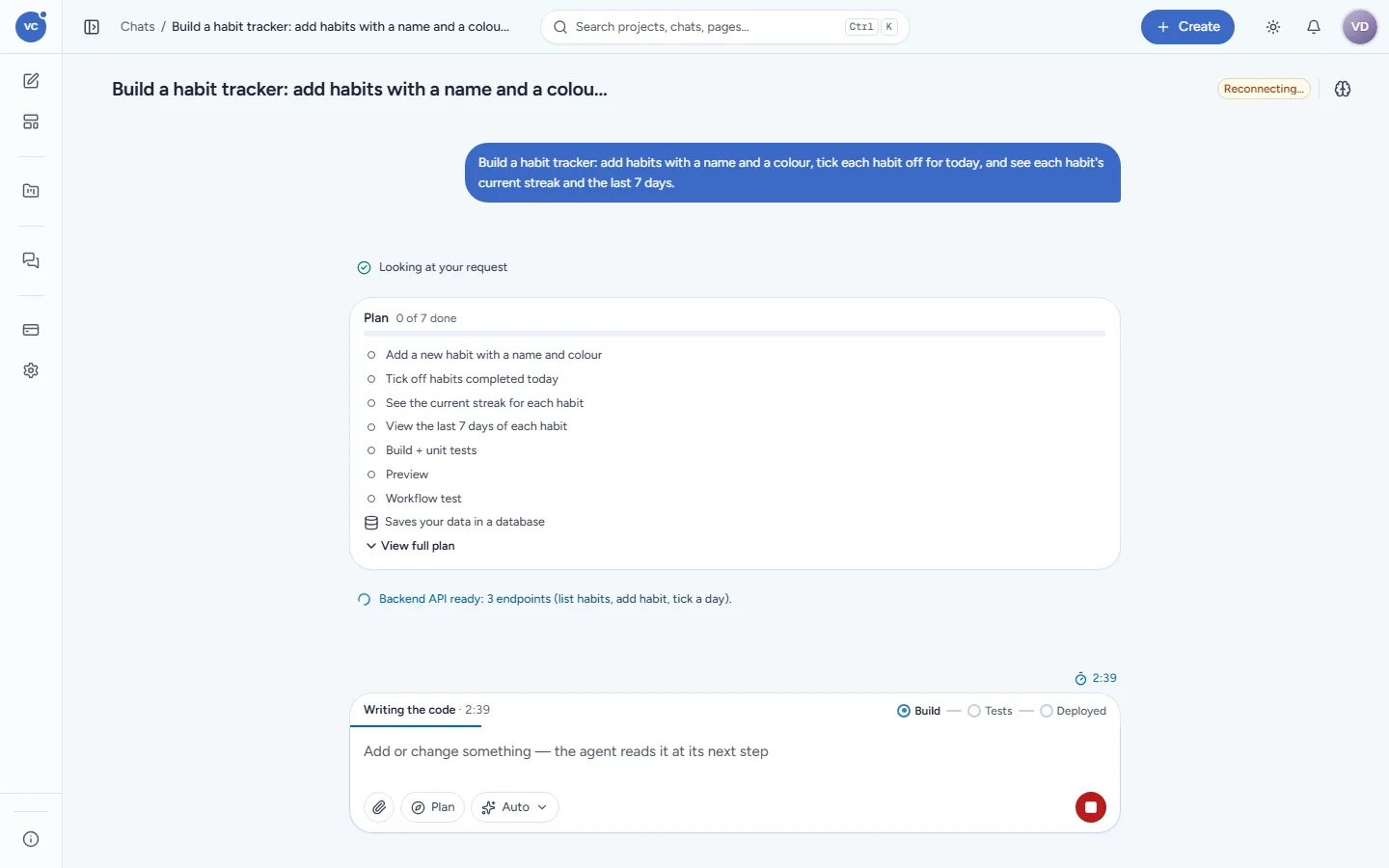
The build strip above the composer shows the stage and a timer: Writing the code · 2:39, then Build — Tests — Deployed.
Short progress lines in the transcript, written for people, for example Backend API ready: 3 endpoints (list habits, add habit, tick a day).
The plan card ticks its features and the system steps as they finish (3 of 7 done).
In the sidebar the project shows Building; it changes to Live, Failed or Needs you.
How long it takes depends on the app. A simple app (a to-do list, a notes app, a habit tracker) is meant to be ready in a few minutes; a large app with many screens takes longer. Builds are split into simple, standard and large by rules, each with its own time budget.
Where your app is built
Every project has its own sandbox: a locked-down container with no administrator rights, a fixed share of memory and CPU, a read-only system, and its own private network. Outside your laptop it can only reach the package registries it needs (through an allow-list). Your code lives in that project's workspace and nowhere else. A sandbox that has been idle for 30 minutes is put to sleep; your code stays. See How Vibe Coder keeps your apps safe.
The checks
When the features are written, Vibe Coder runs its checks itself, in parallel where it can:
Check | What it proves |
|---|---|
Build + unit tests | The app compiles and its unit and API tests pass |
Preview | The app starts and answers in your preview |
Workflow test | A browser clicks through the app like a person (add a habit, tick it, see the streak) and takes a screenshot of each step |
Look unchanged | The app still uses its theme: no stray colours, the layout shell untouched |
Each check has one card in the transcript with its latest result. Open a card to see each test, what was expected, what happened, and the screenshots.
An app is called done only when the unit tests and the workflow test pass on the current code and your preview is ready. No "done" on a half-working app.
When a check fails
Vibe Coder fixes it and runs the check again. While it does, you see Found an issue, fixing it… (round 2), not an error. A check that was fixed is shown as fixed in round N with the details, never in red. A check gets at most three failed rounds; if it still fails, the build ends as failed and says what is wrong in plain words. Write what you want done ("try again", "skip the export for now") and it starts from there.
Stop a build
Click the red stop button (Stop generating) at the right of the composer. The build stops after its current step. A stopped build is not charged.
Talk to it while it builds
Type in the composer (Add or change something — the agent reads it at its next step) and send. Your message is queued and read before the next step, so you can correct course without stopping. See Change your app.
Advanced view
Turn on Settings > General > Advanced view to also see each tool the builder used, the token count, the Code pane and the run inspector (time per step, model calls and their usage).